Overall Design
EMhub-Tomo is a CryoET processing platform that runs heterogeneous pipelines (Warp/M, Relion 5, PyTOM, AreTomo2/3, IMOD, DenoisET, …) from a web interface. It deliberately does not introduce its own project format or tomography data model. A project is a plain Relion project directory, and every job follows Relion’s External job type convention. What EMhub-Tomo adds on top is a thin, declarative layer: form definitions for each job type, JSON workflow templates, site-level program launchers and cluster queues, and a web UI for building, running and inspecting pipelines.
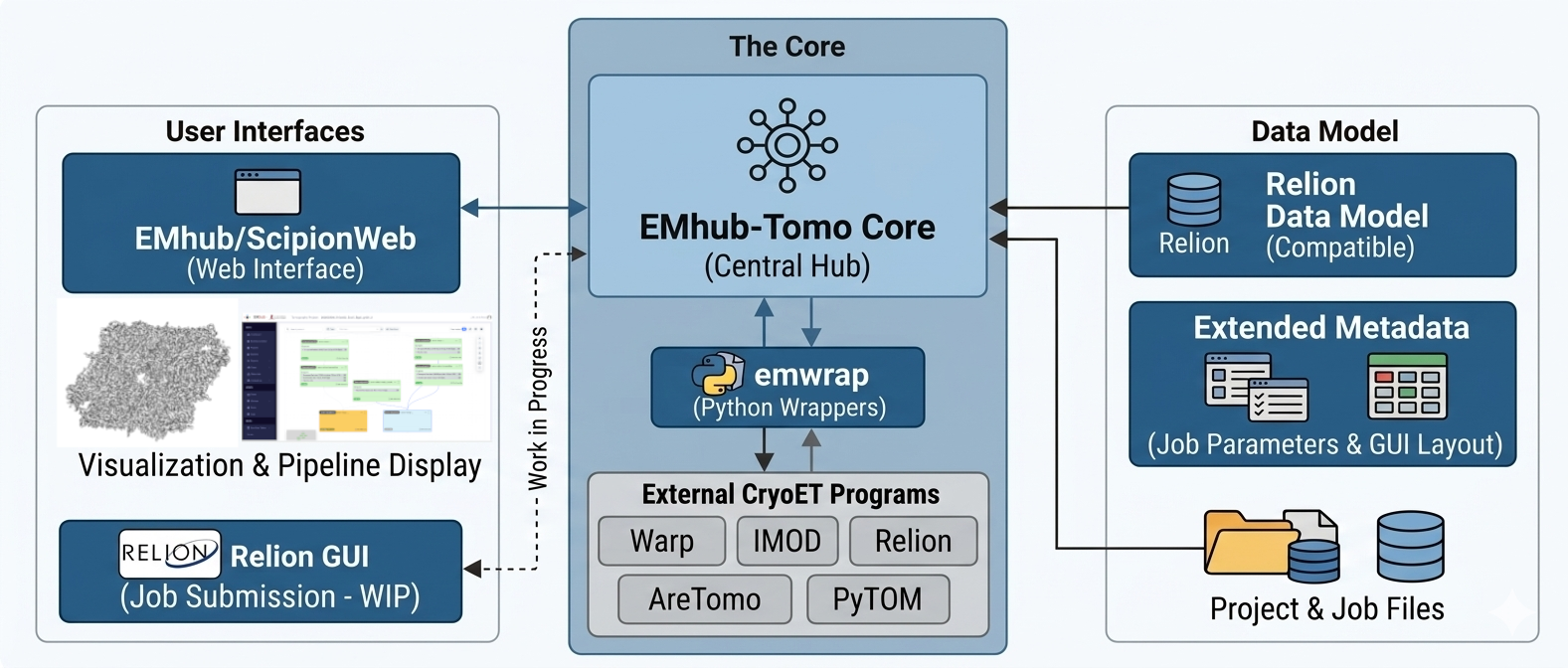
The platform is built from three Python packages:
emtools – low-level utilities for CryoEM/CryoET metadata (STAR files, SQLite), including the reading and writing of Relion pipeline and
job.starfiles.emwrap – wrappers for external programs, the project manager, job forms, workflows, and the launcher and queue configuration.
emhub – the Flask web application, extended with a Tomography section and a project widget based on ScipionWeb components.
Relion 5 as the Project and Data Model
This is the central design decision, and the rest of the platform is built around it.
The project state lives in Relion’s default_pipeline.star. It is read and written through
RelionStar.pipeline_to_workflow and RelionStar.workflow_to_pipeline (in emtools), using
Relion’s own process, node and edge tables. Jobs get Relion-style ids such as External/job004.
Each job folder uses the same files Relion would:
job.starstores the job parameters.RELION_JOB_RUNNING,RELION_JOB_EXIT_SUCCESS,RELION_JOB_EXIT_FAILUREandRELION_JOB_EXIT_ABORTEDreport the job status.RELION_OUTPUT_NODES.stardeclares the outputs, so the Relion pipeliner sees them as regular pipeline nodes.
Project locking uses Relion’s .relion_lock layout, so emwrap, the Relion GUI and other tools
can safely operate on the same project.
Every job is launched the way Relion launches an External job:
<launcher> -i <job_folder>/job.star -o <job_folder>
As a result, a project built in EMhub-Tomo remains readable and extendable from Relion itself. Native Relion tomography jobs (reconstruct tomograms, extract subtomograms, initial model, 3D classification, refinement) live in the same pipeline graph as the Warp, PyTOM or AreTomo wrappers.
The only additional per-job file is an info.json sidecar. It records inputs, outputs, run
information and datatypes used by the web viewers. It sits next to Relion’s files rather than
replacing any of them, and the actual outputs remain Relion-compatible STAR files.
Flexibility Without a New Format
Flexibility comes from a few small, declarative layers rather than from a new data model.
- Job forms
Each job type ships a
form.jsonfile (inemwrap/config/forms) that defines sections, parameter types, conditions, validators and tables. ThepointerClassattribute (for exampleTomograms,VolumeorVolumeMask) gives inputs a light typing, so the UI only offers compatible upstream outputs. See Job Forms.- Program launchers
Small bash scripts, configured in the programs section of
EMWRAP_CONFIG, hide site-specific details such as cluster modules, SBGrid or conda environments. The wrappers never need to know how Warp or Relion are installed locally. See Supported Programs.- Cluster queues
Also configured in
EMWRAP_CONFIG, with a job script template per queue (SLURM, LSF, …) and user-selectable parameters such as the GPU type. See Cluster Queues.- Uniform wrappers
Every emwrap wrapper takes the same two arguments: the input parameters and the output folder. Adding a new program means writing one wrapper plus one form. See Supported Jobs for the jobs currently implemented.
Reproducible and Reusable Workflows
A workflow is a JSON file with a list of job entries. Each entry has a jobid, a jobtype and
its params:
{
    "name": "ApoF - Warp + PyTOM + Relion",
    "jobs": [
        {
            "jobid": "External/job004",
            "jobtype": "emw-warp-mctf",
            "params": {
                "input_tiltseries": "External/job002/frame_series.star",
                "gpus": "4"
            }
        }
    ]
}
Dependencies are implicit. A job depends on another one when any of its parameters points into the
other job’s folder (e.g. External/job002/frame_series.star).
When a workflow is loaded into a project, the project manager rebuilds the dependency graph from these path references. It then creates the jobs in dependency order with new ids, rewriting the references so that the links point to the newly created jobs. The same mechanism is used to:
Duplicate a selection of jobs within a project, preserving the links between them.
Export a finished (sub)pipeline as a workflow that can be replayed in another project, with all its parameters and links intact.
The Warp ApoF Tutorial shows this in practice. Two 11-job workflows mix Warp, PyTOM, Relion and M on EMPIAR-10491, going from raw tilt series through template matching and Relion refinement to iterated M refinement. The same workflows back the automated tests (see Running Tests), which are used to validate an installation.
Web Implementation
The server side is emhub, a Flask application originally designed for data management at CryoEM
facilities, extended with a Tomography section. It calls the emwrap ProjectManager and
ProcessingConfig classes directly, so the web layer is a thin view over the Relion project on disk.
The frontend is a bundled React project widget derived from ScipionWeb, connected to emhub through a service adapter. It provides:
Graph, grid and table views of the processing pipeline.
Drag-and-drop linking of job outputs to compatible inputs.
Job context menus to open, browse, annotate, tag, duplicate, export, delete, select ranges, and stop or restart jobs.
Live job logs.
Viewers for tilt series, per-tilt defocus and motion, tomogram slices with 3D coordinate overlays, volume slices and isosurfaces, FSC curves, and M populations.
Deployment is geared toward remote and HPC hosts. ./emh-tomo --run starts the server on a free
port, prints a ready-to-use ssh -L tunnel command, and logs the admin user in automatically for
the single-user use case.
Current Status
Some parts of the design are still in progress:
Running EMhub-Tomo jobs from the Relion GUI is a work in progress, although the dispatcher entry point (
emh-tomo --submit, configured asrelion_dispatcherinEMWRAP_CONFIG) already exists.Job input validation against the form definitions is still being completed.
Exporting a workflow currently writes the JSON file to the project root.
Applying the same workflow twice adds a second copy of all its jobs to the project.
The web widget API, inherited from ScipionWeb, uses Scipion terminology (protocols), while emwrap uses Relion terminology (jobs). Both refer to the same entities.